
A Gouache-Style Cat Portrait, Animated in One Head Turn
Read the actual prompt behind a prepared orange cat head-turn study, compare it with the source illustration, and plan a smaller first attempt.
Published
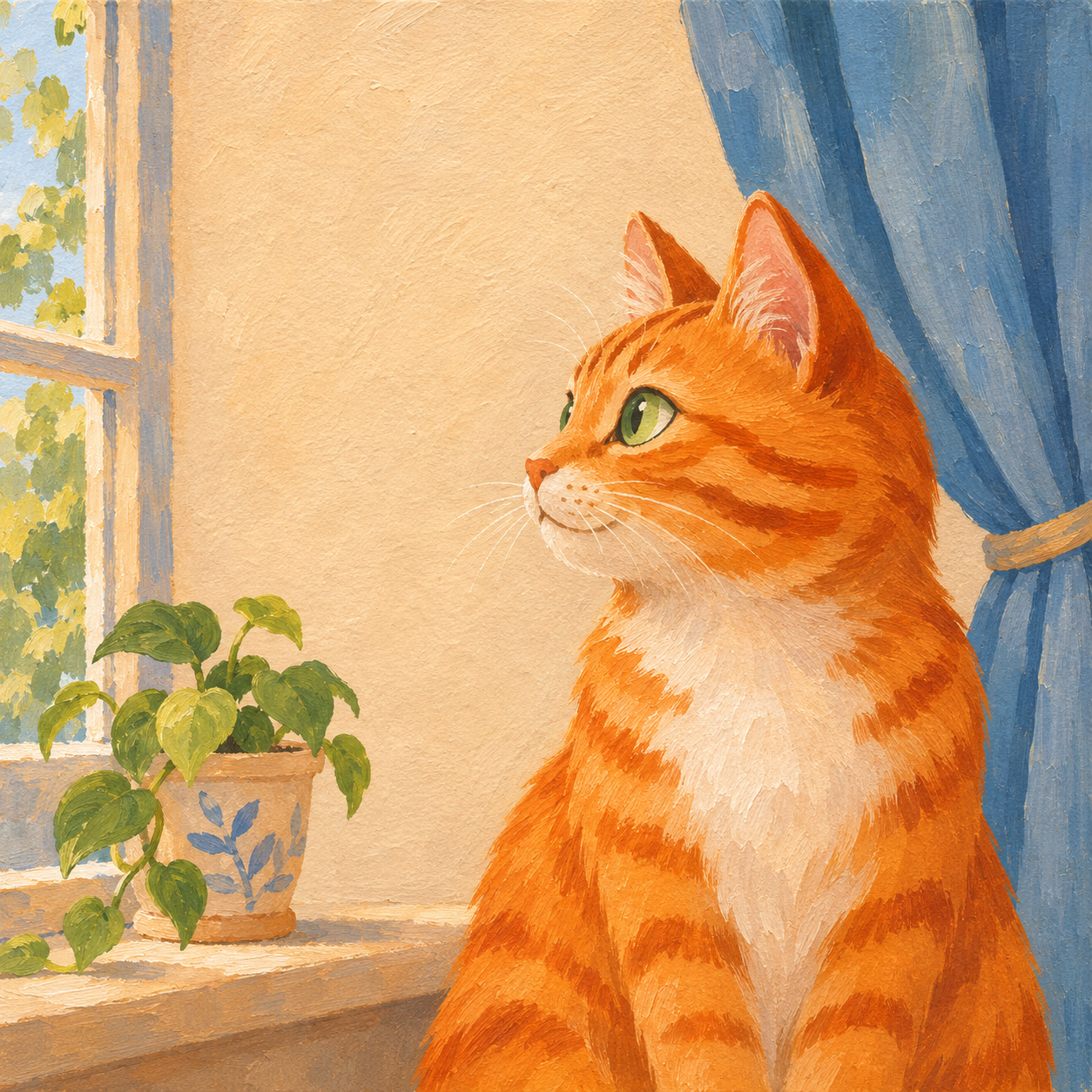
An orange cat looks to the left beside a blue curtain. Its ears are fully inside the frame, and a broad patch of cream wall leaves space around its head. The motion brief asks it to turn toward the viewer, blink once and hold the gaze while its seated body stays still.
You can compare the source illustration with the prepared head-turn video. This is an independently prepared motion study for Animate Artwork. The source is a gouache-style digital illustration created with OpenAI Image Generation. Its animation was made with Wan2.2 Turbo on Fal. The current Animate Artwork generator uses a different model, so judge each new result against its own source image.
The starting pose gives the turn a purpose
The still image already has a clear direction of attention. The cat's visible green eye and nose point left, while the chest faces more toward the viewer. A turn toward the camera therefore changes the relationship between the head and body without requiring the whole cat to move across the scene.
The source also gives you recognizable details to compare later: dark orange stripes along the forehead and cheek, a white muzzle and chest, pointed ears, and visible painted texture. The window frame and curtain are background anchors. If they drift while the cat turns, the animation has changed more than the requested subject.
This composition makes the requested action easy to describe. It does not remove the difficulty of the turn. As the head rotates, the model must supply facial detail that the source does not show from that angle. The newly visible side of the face is a place to inspect, even if the overall gesture reads clearly.
The actual prompt
The following is the exact video prompt recorded for this study, including its timing request:
The orange cat immediately turns its head from the left profile to look directly at the viewer, completing the clear head turn during the first two seconds. Its green eyes follow the turn, then it blinks once and holds eye contact. Keep the seated body and background still. Preserve the same orange tabby markings, white chest, rounded face and painted gouache texture. Locked camera, no zoom, no cuts.
The saved request used a square 1:1 aspect ratio and 720p resolution, with prompt expansion disabled. The public MP4 was remuxed for playback with no audio and without re-encoding. Those are records of how this example was prepared, not settings offered as a reproducibility guarantee for the current workspace.
The prompt gives most of its space to a short sequence: turn, follow with the eyes, blink, hold. It asks for the turn within the first two seconds so the gesture happens early, leaving a quieter finish. That is the requested timing; wording alone does not establish that every frame follows it exactly.
The preservation sentence names details that distinguish this cat rather than asking vaguely for “high quality.” The camera sentence removes another source of movement from the brief. Both express intent. Neither locks the original markings or painted surface in place.
Read the movement in two parts
First watch the video once without pausing. Does the turn register as a single gesture, and does the pause afterward give you time to read the expression? Then open the original beside it and inspect the transition and the settled pose separately.
During the turn, follow the nose, ear tips and cheek markings. Watch whether the head stays attached naturally to the neck and whether its scale changes relative to the white chest. When the second side of the face comes into view, compare the eyes and muzzle as a pair rather than judging only the eye that was visible at the start.
During the hold, look for changes that continue after the main action should have finished. Check whether the eyes keep their shape after the blink and whether the chest, curtain and window frame remain steady. Return to normal playback to judge flicker; paused frames alone cannot show how texture behaves over time.
These checks are a way to evaluate the example yourself. They do not amount to a measured fidelity score or an assertion that every frame is unchanged. The animation quality checklist extends the same approach to fixed edges, painted texture and a loop join.
A smaller prompt to try with your own portrait
The prepared clip's head turn includes a viewpoint change and a blink. If your priority is to retain a character's face, start with less movement. Choose artwork you have permission to use, preferably a portrait already facing the direction you want it to hold.
For a painted cat already looking toward the viewer, this is a suggested starting prompt. It was not used to make the linked video and has not been demonstrated here:
The painted cat blinks once, then holds its original gaze. Keep the head, ears, body and background still. Retain the tabby markings and visible brushwork. Locked camera, no zoom, no cuts.
Adapt it to the visible animal. If your cat is looking sideways, preserve that gaze rather than combining this prompt with a turn toward the viewer. The portrait animation guide offers other restrained movements when a blink does not suit the picture.
If a turn is essential, keep it as the main action and inspect the result before adding a smile, body movement or a camera move. A small request can still change a face; stop if the result no longer represents the character you intended.
Use the example as a starting point
Open the cat example in the artwork workspace to prepare a motion idea. Selecting an example does not submit a new generation. When using your own image, check the selected picture, ratio and complete prompt before proceeding; do not leave the cat's markings or scene details in a prompt for a different subject.
For a new attempt, the workspace accepts JPG or PNG up to 4 MiB, offers 16:9, 1:1 and 9:16, and has a 2,000-character prompt limit. It makes five-second, silent 720p videos. Check current generation availability and the displayed allowance before starting.
The useful question to carry into your own attempt is specific: what should the viewer notice moving, and which details would make the result unusable if they changed? For this cat, the answer starts with one head turn and a recognizable face.